
Climbing Frog (aka Frog Leaps) is platformer game and physics puzzle in one pack!
Frog’s life seems to you a simple and carefree? Dare to try on the frog’s skin in platformer-game Frog Leaps. Three sets of varying difficulty levels to 36 in each. The game still seems simple to you? Try not just to reach the finish and collect all the coins and eat all the flies (three coins and three flies in each level). Coped with this? Try to do this as quickly as possible to get the bonus for travel time!
Game inspired by a plastic frog toy - you press it, release and it jumps. In this game it just quite simple, press on frog, drag it down, arrow then show direction and strength of jump, release finger and frog will jump! Slide Your finger on screen space to panning.
Be careful, game is addictive!
Read More
Happy to inform that Climbing Frog game (former Frog Leaps) is available for download on App Store. It’s free and contain no ads! HD version available for a small fee as $0.99.
Climbing Frog (aka Frog Leaps), our platformer game now available to download for free. Grab it now!
Download: for Android

We are so excited about expansion from Windows Phone to other, more popular platforms. Yes, we talk about Android and iOS. We are worked mega hard for last months. Now we are ready to introduce platformer game for Android and in two steps to realize iOS version. Please subscribe to our twitter account to be first to know about discounts and special promotion events. Thank You for staying with us.
Sincerelly Yours Megahard.info
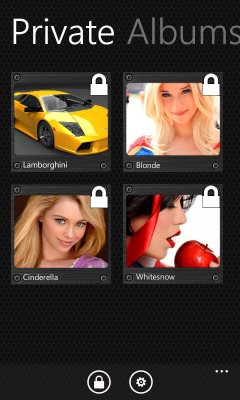
Dark Viewer is Advanced Photo Manager and Photo Vault for Windows Phone.
Features on Version 1.0:
- Live tile for selected album on start screen
- True Color display
- Display all photo albums in flat list
- Protect selected private albums with pin code
- Automatic slide show of selected album
- Go back or next picture by sliding left or right
- Zoom in or out by pinch gesture
- Double click to switch back to full view
Download it free from Marketplace


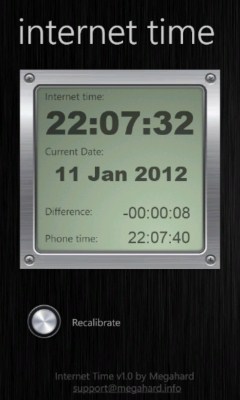
It’s simple SNTP client for Windows Phone. Internet time use precision time servers in internet to get actual precise time.
Unfortunately Windows Phone API does not allow to change system time, so application cannot synchronize time on phone with precision time servers. But it show actual time and difference, so user can manually correct time and date and check how precise current phone time.
Download it free from Marketplace

Chili Slideshow is Windows Phone 7 Application for viewing photos in automated slide show.
Version 1.0 features:
- Show all photo albums in list
- Automatic slide show of selected album
- Customizable delay beetwin slide changes
- Go back or next picture by sliding left or right
- Zoom in or out by pinch gesture
- Double click to switch back to full view
- Suppress lock screen while playing album
App designed in Metro style, if You familiar with Windows Phone, it’s intuitive. App contains two pages, which switching through swipe gesture. Settings page shows
Aftert start and loading, app will show available photo albums from phone collection.
To add new album:
- connect phone to desktop PC
- run Zune software
- go to Collection -> Pictures
- right click on folder, and choose New Album
- put pictures in this folder
- drag this folder to phone icon
After synchronization, disconnect phone from PC and run Chili Slideshow. In album list will appear new album
Download
from WP7 Marketplace.


Chili Slideshow Pro is Windows Phone 7 Application for viewing photos in automated slide show with password lock albums.
Version 1.1:
- Add tile for selected album on start screen
- Support live tiles
- Support shuffle
Version 1.0:
- Protect selected private albums with pin code
- Show all photo albums in list
- Auto lock on task switch
- Automatic slide show of selected album
- Customizable delay beetwin slide changes
- Go back or next picture by sliding left or right
- Zoom in or out by pinch gesture
- Double click to switch back to full view
- Supress lock screen while playing album
Using
App designed in Metro style, if You familiar with Windows Phone, it’s intuitive. App contains two pages, which switching through swipe gesture. Settings page shows
Aftert start and loading, app will show available photo albums from phone collection.
To add new album:
- connect phone to desktop PC
- run Zune software
- go to Collection -> Pictures
- right click on folder, and choose New Album
- put pictures in this folder
- drag this folder to phone icon
After synchronization, disconnect phone from PC and run Chili Slideshow Pro. In album list will appear new album.
Download
Microsoft tag